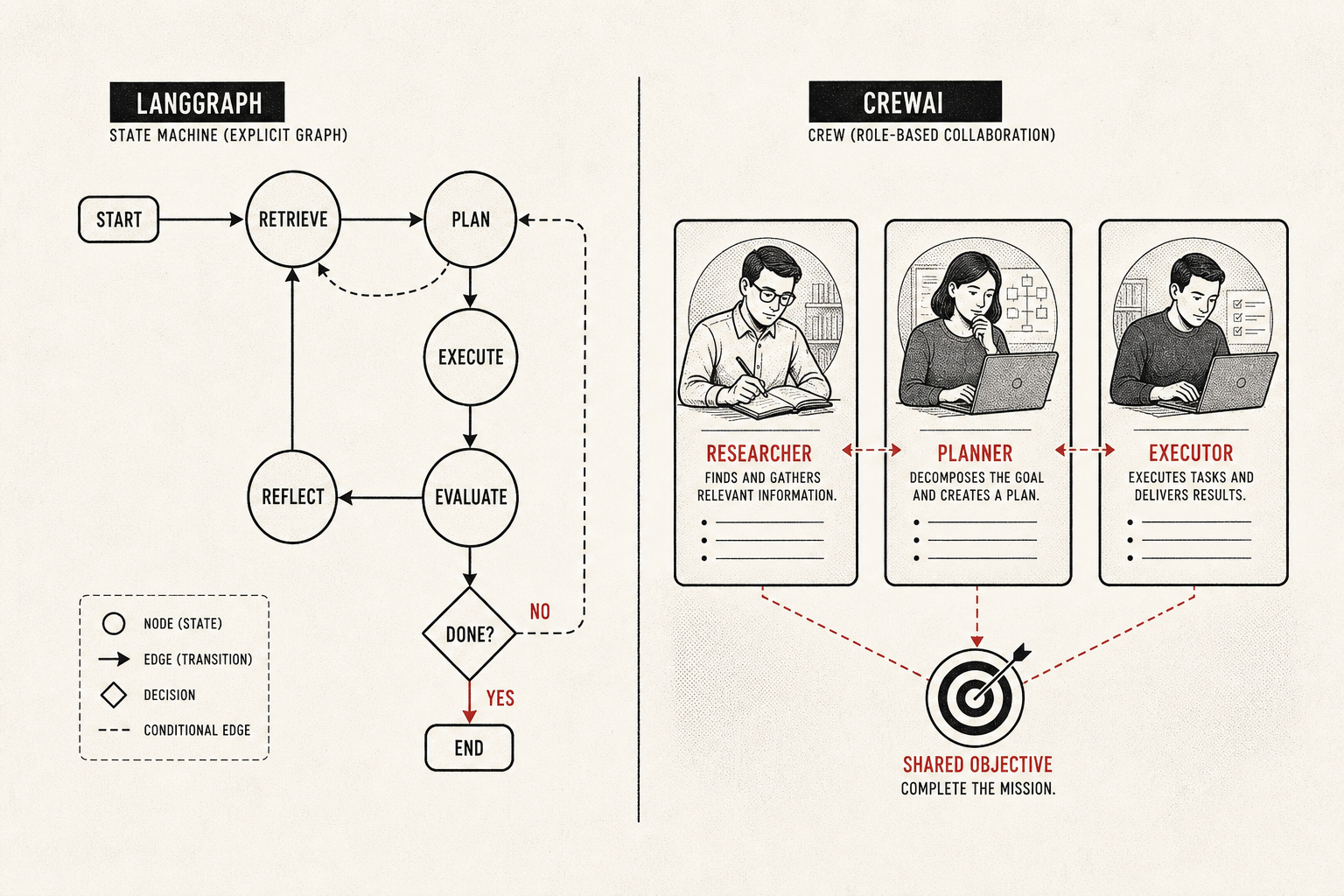
Here is the framing I wish someone had handed me before my first agent migration: choosing between LangGraph and CrewAI is a bet on how you want to manage state, explicit typed graphs versus role abstraction, not a referendum on which repo has more stars. Get that one decision right and most of the downstream arguments answer themselves. Get it wrong and you will feel it the first time an agent misbehaves in production and you cannot tell it what to do next.
I prototype in CrewAI on a Monday and migrate to LangGraph the week compliance asks for checkpoint IDs. That is not a contradiction, it is the workflow. So I will do this the fair-partisan way: claim, evidence, then a link you can open and check yourself. Where a number is a community benchmark rather than a controlled study, I will say so, because half the comparisons floating around are vibes wearing a chart's clothing.
The numbersCrewAI wins the demo, LangGraph wins the incident
Start with the part the benchmarks broadly agree on. By the community comparisons NxCode tracks, CrewAI gets you from idea to working prototype roughly 40% faster than LangGraph, with a learning curve measured in about a day against LangGraph's roughly a week. That gap is real and it is not a knock on LangGraph. CrewAI's role abstraction (define an agent, give it a goal, let the crew collaborate) is genuinely faster to reason about when you are still discovering what your topology even is.
Then production arrives. Towards AI's 2026 enterprise guide rates LangGraph five out of five for production control and puts CrewAI at three for long-running delegation chains. The reason is not framework snobbery, it is architecture, and Figure 1 is the cleanest way I know to hold both truths at once.
Figure 1 · the tradeoff, not the winner
Speed to prototype runs opposite production control
If you remember nothing else: the same property that makes CrewAI fast to start, abstracting state away so you can focus on roles, is the property that makes it harder to control when something goes wrong at hour nine of a delegation chain. That is not a bug. It is the tradeoff, stated honestly.
The mechanismWhat "resume-after-crash" actually requires
LangGraph's headline capability is checkpointing, and it is worth understanding why it is more than a logging feature. Because LangGraph models your workflow as an explicit typed state graph, every node transition has a serializable state object attached. Persist that and you can stop, inspect, and resume from any point. In practice it looks like this:
# LangGraph checkpointing (conceptual)
from langgraph.checkpoint.postgres import PostgresSaver

checkpointer = PostgresSaver.from_conn_string(DB_URL)
graph = builder.compile(checkpointer=checkpointer)

# every step is now durable; resume from a checkpoint_id
# for time-travel debugging or recovery after a crash
That checkpoint_id is the whole game for regulated work. It is what lets you replay a run for an auditor, redirect an agent that took a wrong turn, and recover a multi-hour job that died on a transient API error without restarting from zero. Towards AI puts the human-in-the-loop case bluntly:
"LangGraph is the only production-ready choice if your use case requires humans to review, approve, or redirect agent actions mid-workflow." (Towards AI, 2026 enterprise guide)
CrewAI has not stood still here. Version 1.10 and later added native MCP support and the Flow API for more deterministic orchestration, which closes part of the gap for structured pipelines. But per the NxCode comparison table, durable execution still is not built in the way checkpointing is for LangGraph. You can wire your own persistence, and teams do, but you are building the safety net the other framework ships. Figure 2 is the conceptual version of why that gap exists at all.
Figure 2 · the bet underneath everything
Explicit graph state versus implicit role context
ObservabilityTrace replay you get versus trace replay you build
This is the dimension that quietly decides migrations, and it follows straight from the state model. Because LangGraph already has explicit, serializable state at every node, LangSmith can offer native trace replay: step through a run, inspect the state at each transition, and reproduce a failure deterministically. You did not instrument anything special. The graph was always the trace.
CrewAI's observability story improved sharply with CrewAI Enterprise and Cloud, and for many internal use cases it is enough. But to get comparable depth on a self-managed CrewAI deployment you are typically wiring OpenTelemetry and a backend like Arize yourself, and even then you are reconstructing a story that LangGraph hands you natively. If you want the honest side-by-side of native trace replay against the OTel-plus-collector route, the observability deep dive walks through what each approach actually buys you. The short version from AgentsIndex is worth quoting because it captures the paradox neatly:
"LangGraph's stateful graph model with native checkpointing is the primary reason it dominates enterprise production deployments despite CrewAI having nearly twice the GitHub star count." (AgentsIndex)
Twice the stars, fewer regulated production deployments. That is the clearest evidence I can offer that popularity and production-fitness are different axes, and that picking on star count is picking on the wrong number.
SteelmanWhere the LangGraph-always crowd is wrong
I lean LangGraph for regulated production, so let me argue against myself in good faith, because the "always use LangGraph" reflex causes real waste. First, the complexity tax is genuine: modeling a simple sequential pipeline as a typed state graph is over-engineering, and you will spend a week building scaffolding CrewAI would have given you in an afternoon. If your workflow is linear and supervised, that week is pure cost.
Second, CrewAI Enterprise has closed meaningful gaps. Teams running internal, low-volume, human-supervised agents often find CrewAI not just sufficient but the better fit, because the role abstraction matches how the business already thinks about the work. Third, neither of these is the only game: AutoGen remains a sensible third option for Microsoft and Azure shops, and I am deliberately not adjudicating that one here. The decision rule is narrower than the tribalism suggests.
Decision rule
If an SLA or a compliance requirement means you must resume after a crash, replay a run for an auditor, or interrupt an agent mid-flight, the bet points to LangGraph. If you are validating role topology, running internal supervised low-volume jobs, or still discovering the shape of the problem, CrewAI may be exactly right and faster to boot. The benchmark numbers above are community comparisons, not controlled studies, so weight them as direction, not gospel, and re-run them on your own workload before you cite them in a deck.
What to do MondayPrototype in one, graduate to the other
The move that has never burned me: prototype in CrewAI to find your topology fast, then migrate to LangGraph the moment production control becomes a requirement rather than a nice-to-have. This is not waffling, it is sequencing. You use the fast framework while speed is the constraint and the durable framework once durability is. Figure 3 is the migration I actually run.
Figure 3 · the path, not the pick
Prototype in CrewAI, graduate to LangGraph on a trigger
One more reframe before you go. Framework choice is only one of the skills a team needs, and treating it as the entire decision is a common trap. It sits alongside prompting, evaluation, tool design, and orchestration in the broader agent programming stack, and a brilliant framework choice cannot rescue a stack that is weak on the other four. Keep it in proportion.
The interesting question in 2026 is not "LangGraph or CrewAI." It is "what does my workload actually require of state," and once you answer that honestly, the framework mostly picks itself.
So: prototype fast, migrate on a trigger, and never let a star count make an architecture decision for you. Both frameworks are good. They are just good at different parts of the same job, and knowing which part you are standing in is the whole skill.
Comments (12)
Join the discussion
Sign in to comment, bookmark threads, and continue lessons across sessions.